

Syntax Highlighter Plugins for WordPress
Displaying code within a post is not an easy task. It can cause
various problems and can be quite annoying. But now you can get rid of
this irksome problem — thanks to all the plugins created for it. Many
amazing developers have created awesome plugins to solve this issue. A
plethora of plugins is present out there, but finding the best ones is
tough.
So in order to help you out, today we have a list of 10 Best Syntax Highlighter Plugins for WordPress that will prove to be really helpful for you. All these plugins are quite easy to use and handy. Check them out and pick the one that suits your needs the best!
If you like This Article, you Might be interested on Multi-Author Blogs WordPress Plugins, Related Thumbnails WordPress Plugins, WordPress Plugins For Social Media and Top WordPress Plugins 2011.
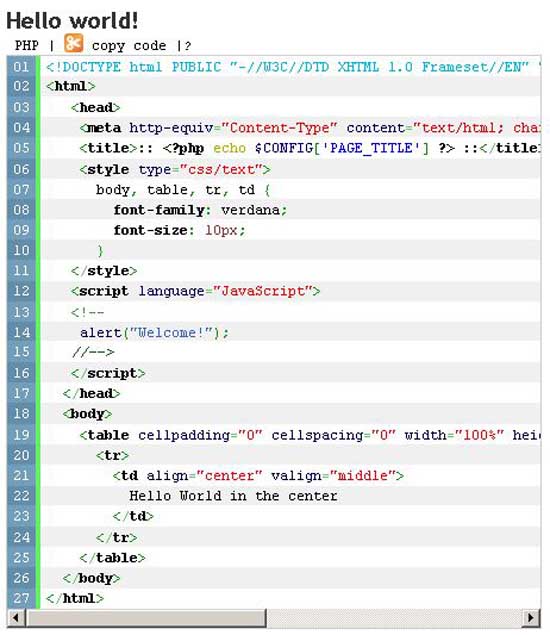 This is a great plugin that makes displaying codes a breeze. It
utilizes the GeSHi highlight system, so it supports 110+ languages,
including PHP, ASP, Html, JavaScript, CSS, Java, Python, Delphi, C++, C,
Visual Basic etc. It highlights syntax with Style attribute, AJAX, PRE
tags, in comments and RSS 2.0 feeds. It is an amazing plugin for all
those people who have to display codes in their posts. It also boasts a
new code theme, ehich is ‘Summer’.
This is a great plugin that makes displaying codes a breeze. It
utilizes the GeSHi highlight system, so it supports 110+ languages,
including PHP, ASP, Html, JavaScript, CSS, Java, Python, Delphi, C++, C,
Visual Basic etc. It highlights syntax with Style attribute, AJAX, PRE
tags, in comments and RSS 2.0 feeds. It is an amazing plugin for all
those people who have to display codes in their posts. It also boasts a
new code theme, ehich is ‘Summer’.
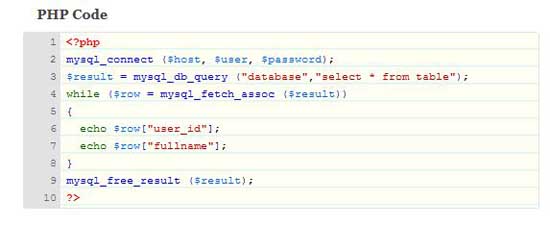 FV Code Highlighter highlights PHP, HTML, CSS and XML. Its default
tag-highlighter color scheme utilizes the same colors that Adobe
Dreamweaver utilizes, making the code type easily recognizable. But you
also have the choice of altering the colors according to your preference
from the WPadmin section. It is extremely user-friendly and allows you
to customize the appearance of codes and code box.
FV Code Highlighter highlights PHP, HTML, CSS and XML. Its default
tag-highlighter color scheme utilizes the same colors that Adobe
Dreamweaver utilizes, making the code type easily recognizable. But you
also have the choice of altering the colors according to your preference
from the WPadmin section. It is extremely user-friendly and allows you
to customize the appearance of codes and code box.
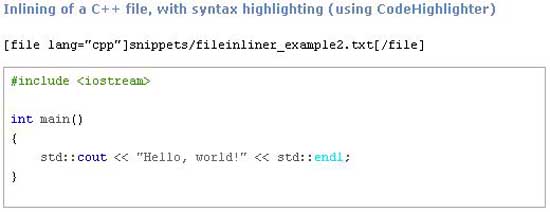 File Inliner allows you to easily display the content of a file
(snippets) in a post. The snippet is placed in a <pre></pre>
block by default and it automatically indents it for prominence. You
are not even required to modify the post after the file has been
modified. This plugin is simply very helpful.
File Inliner allows you to easily display the content of a file
(snippets) in a post. The snippet is placed in a <pre></pre>
block by default and it automatically indents it for prominence. You
are not even required to modify the post after the file has been
modified. This plugin is simply very helpful.
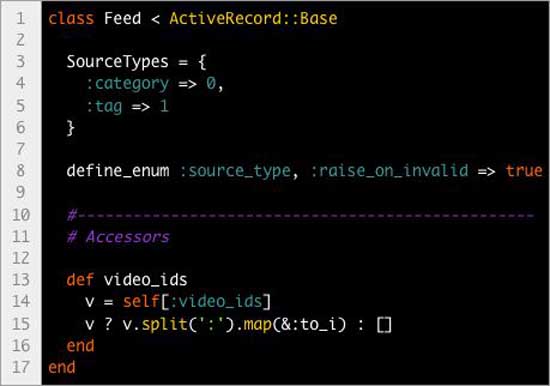 As the name suggests, this plugin syntax highlights the code snippets
in a post. It utilizes the GeSHi highlight system, so it supports most
languages. It also highlights syntax in comments and RSS feeds. It has
many color themes, such as Slush & Poppies, Blackboard, Dawn, Mac
Classic, Twilight, Vibrant Ink and Railscasts. Syntax colors
customization in CSS file is also possible. CodeColorer is presently
available in 25 + major languages, including English, French, Spanish,
Italian, German, Chinese and Arabic etc.
As the name suggests, this plugin syntax highlights the code snippets
in a post. It utilizes the GeSHi highlight system, so it supports most
languages. It also highlights syntax in comments and RSS feeds. It has
many color themes, such as Slush & Poppies, Blackboard, Dawn, Mac
Classic, Twilight, Vibrant Ink and Railscasts. Syntax colors
customization in CSS file is also possible. CodeColorer is presently
available in 25 + major languages, including English, French, Spanish,
Italian, German, Chinese and Arabic etc.
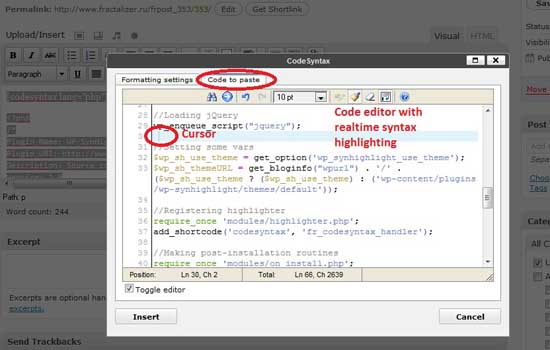 This one is an awesome plugin that carries out syntax highlighting of
code. It functions quite like any other BBCode tag. It simply
highlights anything you place between codesyntax BB code tags.
This one is an awesome plugin that carries out syntax highlighting of
code. It functions quite like any other BBCode tag. It simply
highlights anything you place between codesyntax BB code tags.
Sourec:smashinghub.com
So in order to help you out, today we have a list of 10 Best Syntax Highlighter Plugins for WordPress that will prove to be really helpful for you. All these plugins are quite easy to use and handy. Check them out and pick the one that suits your needs the best!
If you like This Article, you Might be interested on Multi-Author Blogs WordPress Plugins, Related Thumbnails WordPress Plugins, WordPress Plugins For Social Media and Top WordPress Plugins 2011.
10 Best Syntax Highlighter Plugins for WordPress
1. Developer Formatter
This is a great plugin that makes displaying codes a breeze. It
utilizes the GeSHi highlight system, so it supports 110+ languages,
including PHP, ASP, Html, JavaScript, CSS, Java, Python, Delphi, C++, C,
Visual Basic etc. It highlights syntax with Style attribute, AJAX, PRE
tags, in comments and RSS 2.0 feeds. It is an amazing plugin for all
those people who have to display codes in their posts. It also boasts a
new code theme, ehich is ‘Summer’.2. WordPress Plugin – FV Code Highlighter
FV Code Highlighter highlights PHP, HTML, CSS and XML. Its default
tag-highlighter color scheme utilizes the same colors that Adobe
Dreamweaver utilizes, making the code type easily recognizable. But you
also have the choice of altering the colors according to your preference
from the WPadmin section. It is extremely user-friendly and allows you
to customize the appearance of codes and code box.3. File Inliner
File Inliner allows you to easily display the content of a file
(snippets) in a post. The snippet is placed in a <pre></pre>
block by default and it automatically indents it for prominence. You
are not even required to modify the post after the file has been
modified. This plugin is simply very helpful.4. CodeColorer
As the name suggests, this plugin syntax highlights the code snippets
in a post. It utilizes the GeSHi highlight system, so it supports most
languages. It also highlights syntax in comments and RSS feeds. It has
many color themes, such as Slush & Poppies, Blackboard, Dawn, Mac
Classic, Twilight, Vibrant Ink and Railscasts. Syntax colors
customization in CSS file is also possible. CodeColorer is presently
available in 25 + major languages, including English, French, Spanish,
Italian, German, Chinese and Arabic etc.5. WP-SynHighlight
This one is an awesome plugin that carries out syntax highlighting of
code. It functions quite like any other BBCode tag. It simply
highlights anything you place between codesyntax BB code tags.Sourec:smashinghub.com
Categories:
Wordpress


 Posts
Posts


0 comments:
Post a Comment